

magic.wallet.connectWithUI() and other common smart contract interactions like sending a transaction and checking a user’s balance. The sections below go through each of these steps one at a time.
If you want to jump straight into the code, check out this GitHub Repository.
Install the SDK
Navigate to your project directory and install the Magic SDK as a project dependency.Get your Magic Publishable API Key
Grab your Magic Publishable API Key from your Magic Dashboard. If you haven’t already, you’ll need to sign up for a free developer account.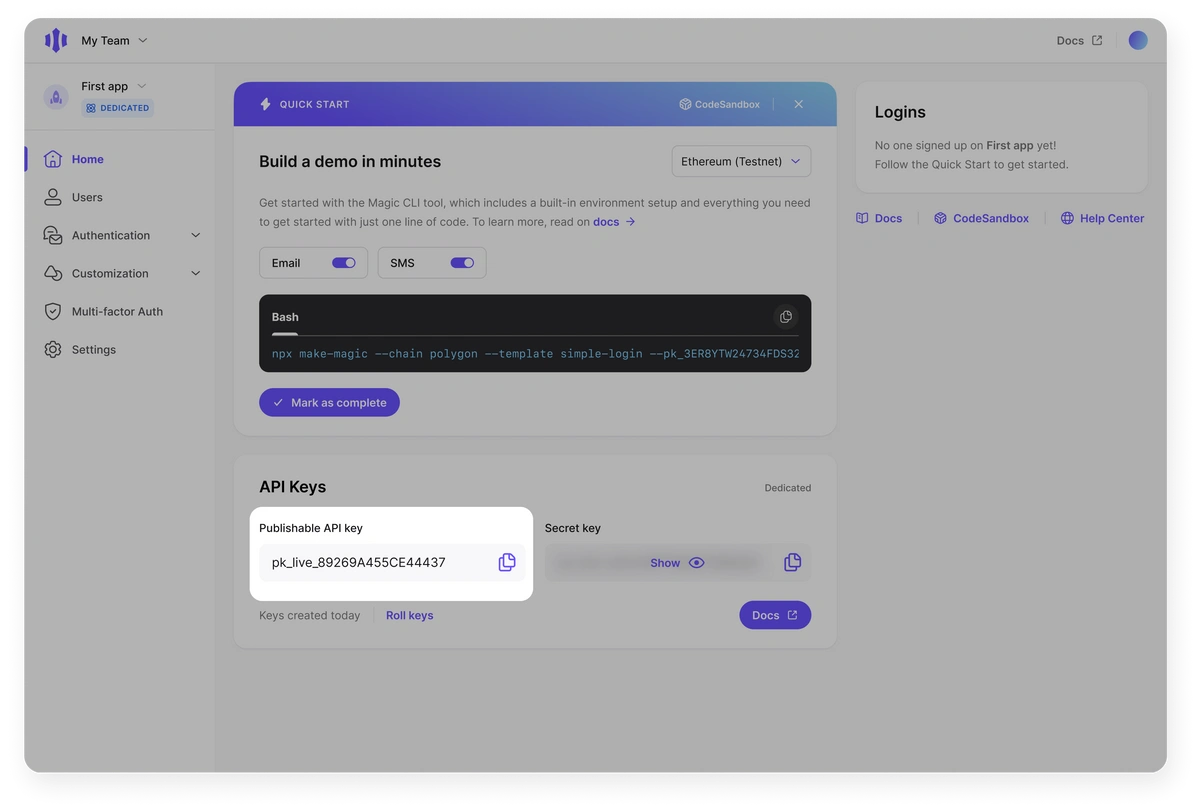
Initialize Magic
To get started, initialize an instance of Magic with your Publishable API Key and your choice of blockchain. Then initialize your chosen blockchain library, like Ethers.js, with the RPC provider in a separate file. This guide uses Ethers v6 APIs such asBrowserProvider, parseEther, and formatEther.
Here’s how you would initialize the Magic instance.
TypeScript
TypeScript
TypeScript
TypeScript
TypeScript
Authenticate your users
Authenticating your users is as easy as callingmagic.wallet.connectWithUI(). This will display Magic’s Login UI. Magic will handle authentication using Email OTP with no additional code needed from your app. You log your users out by calling magic.user.logout().
In addition to the flow provided by the Login UI, you can customize a Dedicated Wallet to use a variety of authentication options like SMS login, OAuth through popular social login providers, and more.
Display the authenticated user’s wallet
Display the authenticated user’s wallet withmagic.wallet.showUI(). This will show the user’s wallet using Magic’s Widget UI.
Get user address
To retrieve the public address of the authenticated user, callmagic.user.getInfo() and access the address through the wallets object. As of SDK v30.0.0, wallet addresses are organized by blockchain under metadata.wallets rather than returned as a top-level publicAddress field.
TypeScript
If you are on SDK v29.x or below, the address is available directly as
metadata.publicAddress. See the getInfo SDK reference for the full legacy response shape and migration details.Get user balance
To get the token balance of a user, import the ethers provider and callgetBalance with the Magic user’s public address. Given that the Magic instance is connected to the Sepolia network, calling getBalance will return the amount of Sepolia tokens the user has.
In this example, we use the provider created earlier.
TypeScript
Interact with the network
Magic integrates with all popular blockchain libraries so that you don’t have to change anything about how you interact with the blockchain. For example, if you’re using Ethereum or other EVM chains, you can get the user’s wallet address or sign and send transactions the same way you normally would using ethers.js. Here is an example of sending a transaction:TypeScript
Customize Your App
This application uses our Embedded Wallet. The Embedded Wallet meets the widest variety of needs while still being incredibly simple to implement. In addition to the baked-in Login UI, it has plenty of customization options, supports social login through providers like GitHub and Discord, and more.Next Steps
We have a suite of resources to help developers and companies with a wide variety of use cases. Below are some ideas to get you started, but feel free to browse our documentation or reach out with specific questions.- Take a look at this demo’s GitHub Repository or CodeSandbox
- Add support for OAuth social providers like Google, GitHub, and Discord
- Add support for one or more of the 30+ blockchains accessible through Magic
- Use Magic across a variety of platforms, including Web, iOS, Android, and more
- Learn more about Magic’s security framework and how it can make your applications more secure
- Read Magic’s Whitepaper