> ## Documentation Index
> Fetch the complete documentation index at: https://docs.magic.link/llms.txt
> Use this file to discover all available pages before exploring further.
# Widget UI
## Overview
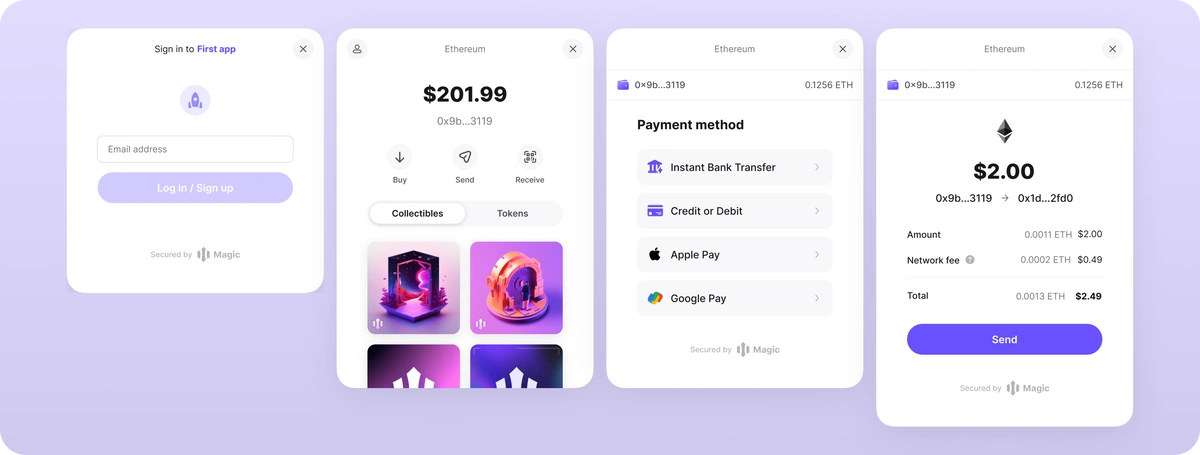
Get to market faster with our out-of-the-box embedded wallet widgets that helps users view their assets and perform common blockchain interactions. You can customize the wallet UI experience by incorporating branding, NFTs, fiat-onramps, and more, allowing you to tailor the perfect web3 experience for your end-users.
The Widget UI currently supports the following blockchains: **Ethereum, Polygon, Base, Arbitrum, and Optimism.**
 ## Use Cases
* **Full Wallet Experience:** Embed our widget UI in your app with just a single line of code, allowing your users to manage, view, send, and receive blockchain assets
* **Transaction Signing:** Utilize our secure personal signature confirmation to collect direct confirmation from the user anytime a signature is requested from their wallet
* **Displaying Assets:** Show the user their address, token balances and/or NFTs
* **Fiat On-Ramps:** Allow your users to purchase crypto with fiat directly into their Magic wallet. We've partnered with Stripe to provide fiat on-ramp for our wallets. Check out their supported blockchains, currencies, and geographies [here](https://stripe.com/docs/crypto/overview#feature-set). For other on-ramp providers, please reach out for more information.
## Usage
To utilize the widget UI, you can call any of the following methods:
```javascript JavaScript icon="square-js" theme={null}
magic.wallet.connectWithUI() // Simple Email OTP login form
magic.wallet.showUI() // Full end-user wallet experience
magic.wallet.showAddress()
magic.wallet.showSendTokensUI()
magic.wallet.showBalances()
magic.wallet.showNFTs()
magic.wallet.showOnRamp()
```
### `connectWithUI`
Renders a simple login form UI to collect the user's email address and authenticate them passwordlessly using a one-time passcode (OTP) sent to the email address they input.
### `showUI`
Displays the fully navigable wallet to the user that adheres to the toggled configurations on your developer dashboard’s Widget UI tab. This is only supported for users who login with email or Google. User must be signed in for this method to return or else it will throw an error.
### `showAddress`
Displays an iframe with the current user’s wallet address in a QR Code.
### `showSendTokensUI`
Displays an iframe with UI to help the user transfer tokens from their account to another address.
### `showBalances`
Displays an iframe that displays the user’s token balances from the currently connected network.
### `showNFTs`
Displays an iframe that shows the user’s NFTs in both an aggregated and detailed individual view. **Supported only on Ethereum and Polygon.** Ensure this is enabled in your developer dashboard via the ‘Widget UI’ tab.
### `showOnRamp`
Displays an iframe modal with various on-ramp providers for users to purchase crypto directly to their wallet.
To use fiat on-ramp from the various providers for Embedded Wallet apps, **please contact us to complete the mandatory KYB process with the payment provider**. Once approved, ensure this toggle is enabled in your developer dashboard via the ‘Widget UI’ tab.
## Configuration
The developer dashboard’s "Widget UI" tab contains configurations that allow you to customize the wallet UI with some optional toggles:

* With the “NFT” toggle, you can hide or show collectibles to your users. This setting will apply across all the UI methods.
* With transaction signing on, any supported EVM RPC methods that require a signature will trigger a secure end-user confirmation prompt.
**Note:** Once you enable or disable a toggle, the client will need to be reloaded / refreshed in order to see the changes.
You can also customize the [branding and theming of the UI](/embedded-wallets/wallets/customization/brand-and-theme) through the developer dashboard.
## Resources
* [Wallet Module Methods](/embedded-wallets/sdk/client-side/javascript#wallet-module)
* [API Reference](/embedded-wallets/sdk/client-side/javascript)
```
```
## Use Cases
* **Full Wallet Experience:** Embed our widget UI in your app with just a single line of code, allowing your users to manage, view, send, and receive blockchain assets
* **Transaction Signing:** Utilize our secure personal signature confirmation to collect direct confirmation from the user anytime a signature is requested from their wallet
* **Displaying Assets:** Show the user their address, token balances and/or NFTs
* **Fiat On-Ramps:** Allow your users to purchase crypto with fiat directly into their Magic wallet. We've partnered with Stripe to provide fiat on-ramp for our wallets. Check out their supported blockchains, currencies, and geographies [here](https://stripe.com/docs/crypto/overview#feature-set). For other on-ramp providers, please reach out for more information.
## Usage
To utilize the widget UI, you can call any of the following methods:
```javascript JavaScript icon="square-js" theme={null}
magic.wallet.connectWithUI() // Simple Email OTP login form
magic.wallet.showUI() // Full end-user wallet experience
magic.wallet.showAddress()
magic.wallet.showSendTokensUI()
magic.wallet.showBalances()
magic.wallet.showNFTs()
magic.wallet.showOnRamp()
```
### `connectWithUI`
Renders a simple login form UI to collect the user's email address and authenticate them passwordlessly using a one-time passcode (OTP) sent to the email address they input.
### `showUI`
Displays the fully navigable wallet to the user that adheres to the toggled configurations on your developer dashboard’s Widget UI tab. This is only supported for users who login with email or Google. User must be signed in for this method to return or else it will throw an error.
### `showAddress`
Displays an iframe with the current user’s wallet address in a QR Code.
### `showSendTokensUI`
Displays an iframe with UI to help the user transfer tokens from their account to another address.
### `showBalances`
Displays an iframe that displays the user’s token balances from the currently connected network.
### `showNFTs`
Displays an iframe that shows the user’s NFTs in both an aggregated and detailed individual view. **Supported only on Ethereum and Polygon.** Ensure this is enabled in your developer dashboard via the ‘Widget UI’ tab.
### `showOnRamp`
Displays an iframe modal with various on-ramp providers for users to purchase crypto directly to their wallet.
To use fiat on-ramp from the various providers for Embedded Wallet apps, **please contact us to complete the mandatory KYB process with the payment provider**. Once approved, ensure this toggle is enabled in your developer dashboard via the ‘Widget UI’ tab.
## Configuration
The developer dashboard’s "Widget UI" tab contains configurations that allow you to customize the wallet UI with some optional toggles:

* With the “NFT” toggle, you can hide or show collectibles to your users. This setting will apply across all the UI methods.
* With transaction signing on, any supported EVM RPC methods that require a signature will trigger a secure end-user confirmation prompt.
**Note:** Once you enable or disable a toggle, the client will need to be reloaded / refreshed in order to see the changes.
You can also customize the [branding and theming of the UI](/embedded-wallets/wallets/customization/brand-and-theme) through the developer dashboard.
## Resources
* [Wallet Module Methods](/embedded-wallets/sdk/client-side/javascript#wallet-module)
* [API Reference](/embedded-wallets/sdk/client-side/javascript)
```
```