> ## Documentation Index
> Fetch the complete documentation index at: https://docs.magic.link/llms.txt
> Use this file to discover all available pages before exploring further.
# Farcaster Login
## Overview
Provide users the ability to log into your app via Farcaster. This login method allows Farcaster users to login with their account and create a Magic wallet associated to their digital Farcaster Identifier (FID). Developers can access Farcaster user information such as `fid` and `username`, along with Magic metadata.
* [Test out Farcaster login here!](https://farcaster-example.vercel.app/magic-sdk)
 ### Compatibility
Farcaster Login is only available as of `magic-sdk@28.0.7`.
## Use Cases
* Authenticate and create wallets for end users by prompting users to login via Farcaster native app.
## Usage
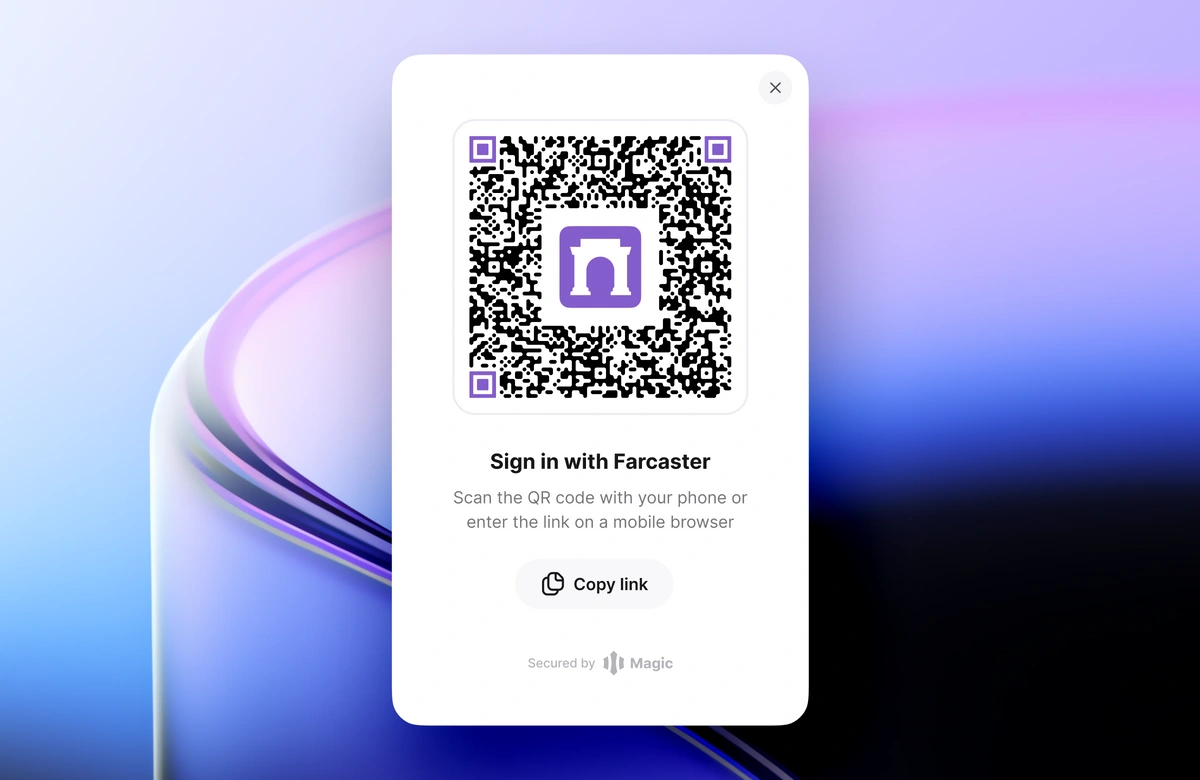
You can implement Farcaster Login by including the Farcaster extension to your Magic instance. Once you've created a Magic client-side instance with the extension, log users in by calling `magicClient.farcaster.login()`. You can pass a `showUI` parameter boolean indicating whether or not to show a pre-built modal interface displaying the QR code to the user. When `false`, you can implement a custom UI to continue the Farcaster login.
Once logged in, you can retrieve the user's Magic wallet address using [`getInfo`](/embedded-wallets/sdk/client-side/javascript#getinfo) for Web/React Native.
## Login
Farcaster Login works as an extension to Magic SDK. To add Farcaster Login to your Magic integration, start by installing the **Farcaster Extension**:
```bash NPM icon="npm" theme={null}
npm install magic-sdk @magic-ext/farcaster
```
```bash Yarn icon="yarn" theme={null}
yarn add magic-sdk @magic-ext/farcaster
```
## Initialization
When creating your Magic instance, you'll need to add an instance of `FarcasterExtension` to the Magic constructor:
```javascript JavaScript icon="square-js" theme={null}
import { Magic } from 'magic-sdk';
import { FarcasterExtension } from '@magic-ext/farcaster';
const magic = new Magic('YOUR_API_KEY', {
extensions: [new FarcasterExtension()],
});
```
### Arguments
* `showUI?` (Boolean): If `true`, show an out-of-the-box UI to display the QR code to the user. Defaults to `true`.
### Returns
* `PromiEvent`: The promise resolves upon authentication request success and rejects with a specific error code if the request fails. The resolved value is a Decentralized ID token with a default 15-minute lifespan.
### Example
```javascript JavaScript icon="square-js" theme={null}
import { Magic } from 'magic-sdk';
import { FarcasterExtension } from '@magic-ext/farcaster';
const magic = new Magic('YOUR_API_KEY', {
extensions: [new FarcasterExtension()],
});
try {
await magic.farcaster.login();
} catch {
// Handle errors or reject if required!
}
try {
const didToken = await magic.farcaster.login({ showUI: false });
} catch {
// Handle errors if required!
}
```
### Event Handling
A white-label Farcaster Login flow is available when passing `showUI: false` to this login method. Here's a short example to illustrate listening for and emitting events during the login flow:
```javascript JavaScript icon="square-js" theme={null}
import { Magic } from 'magic-sdk';
import { FarcasterExtension } from '@magic-ext/farcaster';
const magic = new Magic('YOUR_API_KEY', {
extensions: [new FarcasterExtension()],
});
try {
const handle = magic.farcaster.login({ showUI: false });
handle
.on("channel", (channel) => {
console.log("channel URL", channel.url)
// display custom UI with QR code
})
.on("success", (data) => {
// get Farcaster user information
})
.on('done', (did) => {
// get DID Token
})
.on("failed", (e) => {
// user rejects
})
.on('error', (e) => {
// handle error
})
.on('settled', (e) => {
// handle resolve or reject
});
} catch (err) {
// handle errors
}
```
## Resources
* [Quickstart](/embedded-wallets/quickstart/overview)
* [Web API documentation](/embedded-wallets/sdk/client-side/javascript#loginwithemailotp)
* [React Native API documentation](/embedded-wallets/sdk/client-side/react-native#loginwithemailotp)
### Compatibility
Farcaster Login is only available as of `magic-sdk@28.0.7`.
## Use Cases
* Authenticate and create wallets for end users by prompting users to login via Farcaster native app.
## Usage
You can implement Farcaster Login by including the Farcaster extension to your Magic instance. Once you've created a Magic client-side instance with the extension, log users in by calling `magicClient.farcaster.login()`. You can pass a `showUI` parameter boolean indicating whether or not to show a pre-built modal interface displaying the QR code to the user. When `false`, you can implement a custom UI to continue the Farcaster login.
Once logged in, you can retrieve the user's Magic wallet address using [`getInfo`](/embedded-wallets/sdk/client-side/javascript#getinfo) for Web/React Native.
## Login
Farcaster Login works as an extension to Magic SDK. To add Farcaster Login to your Magic integration, start by installing the **Farcaster Extension**:
```bash NPM icon="npm" theme={null}
npm install magic-sdk @magic-ext/farcaster
```
```bash Yarn icon="yarn" theme={null}
yarn add magic-sdk @magic-ext/farcaster
```
## Initialization
When creating your Magic instance, you'll need to add an instance of `FarcasterExtension` to the Magic constructor:
```javascript JavaScript icon="square-js" theme={null}
import { Magic } from 'magic-sdk';
import { FarcasterExtension } from '@magic-ext/farcaster';
const magic = new Magic('YOUR_API_KEY', {
extensions: [new FarcasterExtension()],
});
```
### Arguments
* `showUI?` (Boolean): If `true`, show an out-of-the-box UI to display the QR code to the user. Defaults to `true`.
### Returns
* `PromiEvent`: The promise resolves upon authentication request success and rejects with a specific error code if the request fails. The resolved value is a Decentralized ID token with a default 15-minute lifespan.
### Example
```javascript JavaScript icon="square-js" theme={null}
import { Magic } from 'magic-sdk';
import { FarcasterExtension } from '@magic-ext/farcaster';
const magic = new Magic('YOUR_API_KEY', {
extensions: [new FarcasterExtension()],
});
try {
await magic.farcaster.login();
} catch {
// Handle errors or reject if required!
}
try {
const didToken = await magic.farcaster.login({ showUI: false });
} catch {
// Handle errors if required!
}
```
### Event Handling
A white-label Farcaster Login flow is available when passing `showUI: false` to this login method. Here's a short example to illustrate listening for and emitting events during the login flow:
```javascript JavaScript icon="square-js" theme={null}
import { Magic } from 'magic-sdk';
import { FarcasterExtension } from '@magic-ext/farcaster';
const magic = new Magic('YOUR_API_KEY', {
extensions: [new FarcasterExtension()],
});
try {
const handle = magic.farcaster.login({ showUI: false });
handle
.on("channel", (channel) => {
console.log("channel URL", channel.url)
// display custom UI with QR code
})
.on("success", (data) => {
// get Farcaster user information
})
.on('done', (did) => {
// get DID Token
})
.on("failed", (e) => {
// user rejects
})
.on('error', (e) => {
// handle error
})
.on('settled', (e) => {
// handle resolve or reject
});
} catch (err) {
// handle errors
}
```
## Resources
* [Quickstart](/embedded-wallets/quickstart/overview)
* [Web API documentation](/embedded-wallets/sdk/client-side/javascript#loginwithemailotp)
* [React Native API documentation](/embedded-wallets/sdk/client-side/react-native#loginwithemailotp)