> ## Documentation Index
> Fetch the complete documentation index at: https://docs.magic.link/llms.txt
> Use this file to discover all available pages before exploring further.
# Account Recovery
export const StartupPlanCallout = () => {
return
This feature requires a subscription to Startup or Growth plan.
;
};
## Overview
This feature requires two prerequisites:
1. The primary login factor is an email (this includes `loginWithMagicLink` and `loginWithEmailOTP` implementations)
2. The user can prove ownership of a phone number, which will be used as the recovery factor
### Compatibility
Account recovery methods are available on the following client-side SDKs:
* [Web](/embedded-wallets/sdk/client-side/javascript)
* [React Native](/embedded-wallets/sdk/client-side/react-native)
* [iOS](/embedded-wallets/sdk/client-side/ios)
* [Android](/embedded-wallets/sdk/client-side/android)
## Usage
## Enabling Account Recovery
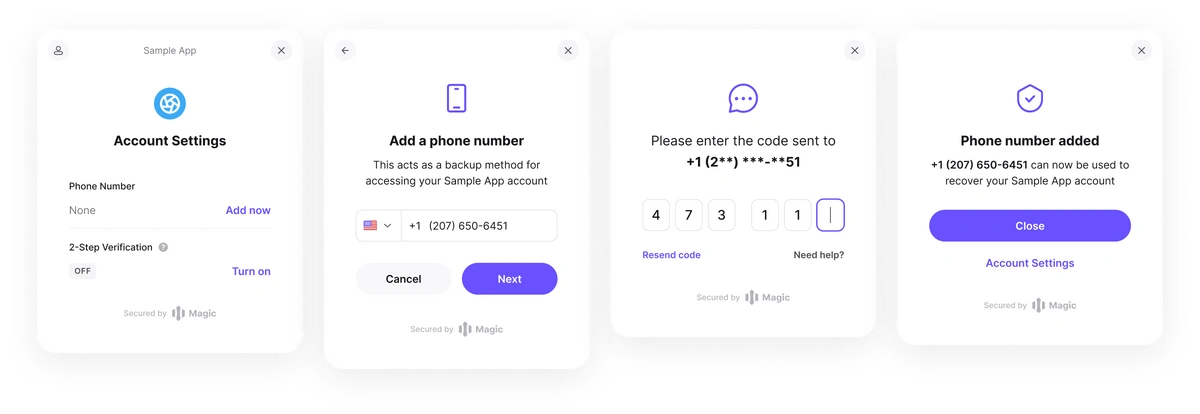 To enable SMS recovery for your users:
```javascript JavaScript icon="square-js" theme={null}
magic.user.showSettings();
```
This will display a settings modal where users will be able to add a recovery factor.
Additionally, Magic supports a deep linking flow where you can send users straight to adding a recovery factor. [The flow can also be whitelabeled](/embedded-wallets/sdk/client-side/javascript#show-settings-show-ui-false-page-recovery):
```javascript JavaScript icon="square-js" theme={null}
magic.user.showSettings({ page: 'recovery' });
```
## Recover Account
To enable SMS recovery for your users:
```javascript JavaScript icon="square-js" theme={null}
magic.user.showSettings();
```
This will display a settings modal where users will be able to add a recovery factor.
Additionally, Magic supports a deep linking flow where you can send users straight to adding a recovery factor. [The flow can also be whitelabeled](/embedded-wallets/sdk/client-side/javascript#show-settings-show-ui-false-page-recovery):
```javascript JavaScript icon="square-js" theme={null}
magic.user.showSettings({ page: 'recovery' });
```
## Recover Account
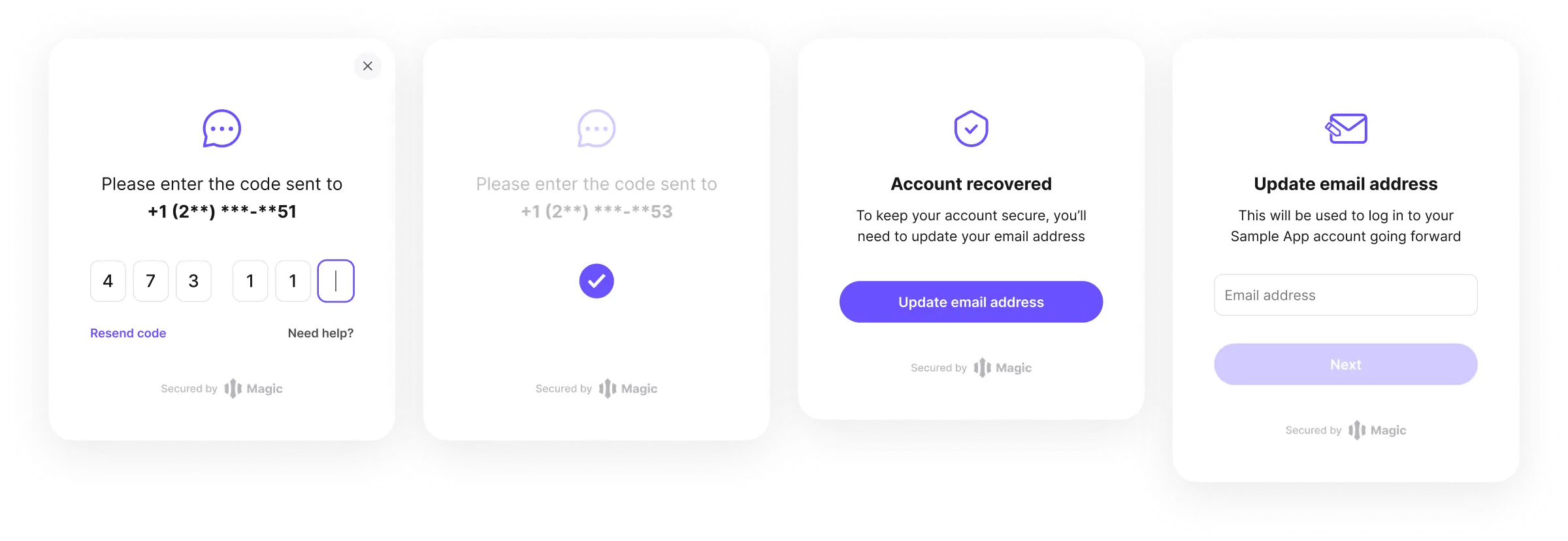 Once a recovery factor is a set up, a user can recover their account. To enable this, the developer should call the following:
```javascript JavaScript icon="square-js" theme={null}
magic.user.recoverAccount({ email: email })
```
It’s important to note that updating the recovery factor is a security sensitive operation so users will first be prompted to demonstrate account ownership by authenticating their email via a one-time-passcode before they are able to add a recovery phone number.
Once a recovery factor is a set up, a user can recover their account. To enable this, the developer should call the following:
```javascript JavaScript icon="square-js" theme={null}
magic.user.recoverAccount({ email: email })
```
It’s important to note that updating the recovery factor is a security sensitive operation so users will first be prompted to demonstrate account ownership by authenticating their email via a one-time-passcode before they are able to add a recovery phone number.